Pages

Showing posts with label Windows XP. Show all posts

Friday, 3 April 2015

Windows XP clings to No. 2 spot as Windows 10 gets closer

net-apps-mar-2015.jpg
Windows XP is still alive and kicking.Net Applications
Windows XP continues its descent among desktop operating systems, though it's far from dead and buried.
Looking at the overall Web traffic for desktop operating systems across the globe, Net Applications gave XP a 16.9 percent share for the month of March, a hefty drop from the 19.1 percent recorded in February.
Though XP's grip on the market continues to loosen, it remains the No. 2 most-used operating system based on Net Application's Web stats, beating Windows 8 and 8.1 and their collective share of 14 percent. Windows 8.1 took the third spot with a 10.5 percent share, leaving Windows 8 in fifth place with just 3.5 percent.
Windows 7 holds the top spot, with a share of 58 percent.
The enduring hold of the 13-year-old Windows XP on PC users underscores the challenges Microsoft has faced as it tries to move ahead with new versions of its flagship operating system, which the company says has more than 1.5 billion users around the world. The staying power has even proven resistant to Microsoft's end of support for XP a year ago, which put an end to bug fixes and and other patches, leaving users more vulnerable to security threats.
There are ripple effects as well. Last month, chipmaker Intel slashed nearly $1 billion off its quarterly revenue outlook, in large part because small and midsize businesses have been reluctant to upgrade from Windows XP -- a popular but now 13-year-old operating system. PC makers, such as Hewlett-Packard, Lenovo and Acer, would also feel a pinch from slower refreshes from Windows XP.
The next leap forward comes this summer when Microsoft plans to release Windows 10, which among other things aims to avoid the missteps of Windows 8 and to provide a consistent software experience across devices including desktops, laptops, smartphones and even Internet of Things gear including ATMs and ultrasound machines.
With Windows 10 arriving soon, what choices are available to those who want to upgrade?
For users of Windows 7 and Windows 8.1, Microsoft is offering free upgrades to Windows 10 for the first year. That means you can download and install Windows 10 for free and directly upgrade your existing PC. But users still running Windows XP or Vista won't be able to ugprade their PCs directly to Windows 10, according to Microsoft. That leaves them the choice of upgrading to Windows 8.1 and then to Windows 10 or simply buying a new PC this summer already equipped with Windows 10.
Currently available as a technical preview, Windows 10 has been showing up as a blip on Net Applications' radar. For March, the new OS took home a share of just under 0.1 percent.

Tuesday, 27 May 2014

Microsoft cautions against Windows XP hack


windows-xp.jpg
Windows XPCNET

Microsoft is warning XP users to steer clear of a hack that installs security updates despite the recent end of support for the aged OS.
In a statement sent to ZDNet on Monday, Microsoft explained:
"We recently became aware of a hack that purportedly aims to provide security updates to Windows XP customers. The security updates that could be installed are intended for Windows Embedded and Windows Server 2003 customers and do not fully protect Windows XP customers. Windows XP customers also run a significant risk of functionality issues with their machines if they install these updates, as they are not tested against Windows XP. The best way for Windows XP customers to protect their systems is to upgrade to a more modern operating system, like Windows 7 or Windows 8.1."
Microsoft turned off the support tap for Windows XP in early April, which means the software giant will no longer provide bug fixes, security patches, or other updates for the OS. That cutoff puts XP users at risk, so it's only natural that some would try to find a workaround to keep their XP computers secure.
As described by Betanews, the hack directs updates intended for Windows Embedded Industry and Windows Server 2003 to XP machines via a Registry change. But XP isn't quite the same as Windows Embedded or Server 2003.

Wednesday, 2 April 2014

Here's some advice about Windows XP

Windows XP is dying. On April 8, Microsoft will stop supporting the ancient operating system that was released in 2001 — and at one point was used by 400 million people.
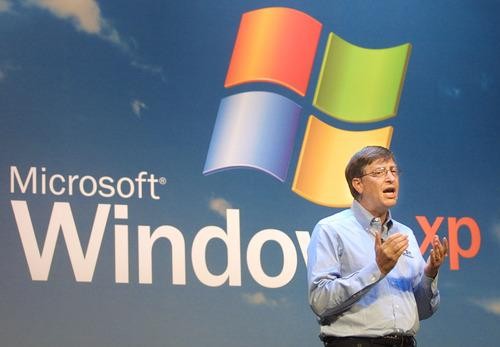
imageBill Gates introducing Windows XP in October, 2001. Photo: Getty Images.
You might think that an operating system that was actually engineered in the late 90s would be fully obsolete and unused by now. After all, since XP came out, Microsoft has released several major replacement versions: Windows Vista, Windows 7, and Windows 8 (recently upgraded to Windows 8.1).
But there’s something about Windows XP. It’s basic, stable, fast enough, and good enough for a lot of people. It’s still running on more than 10 percent of the world’s computers, and it’s huge in China. 
Still, it’s time. It’s hard to keep an operating system this old up to snuff in today’s online environment. XP works, but it’s not built to the same security level as modern operating systems. Microsoft doesn’t want to keep writing new security upgrades for it, so on April 8, it’s stopping. No more security updates. No more support. Your XP computer will still work, but Microsoft won’t help you anymore. Microsoft is pretty harsh about it: “XP cannot be considered safe to use after support ends.”
Microsoft urges you to upgrade. There’s even a site that tells you when your XP world will end: AmIRunningXP.com. Microsoft also has more info on what "end of support" means. To be fair, moving off XP would be a smart thing to do. Newer operating systems are easier to use (at least most of them), they run the cool new apps, and they’re definitely safer. But how do you move from an old computer that’s running XP into the modern era? I’ve heard a lot of advice on how to make the transition. Not all of it good. Here are your options. Bad ideas first:
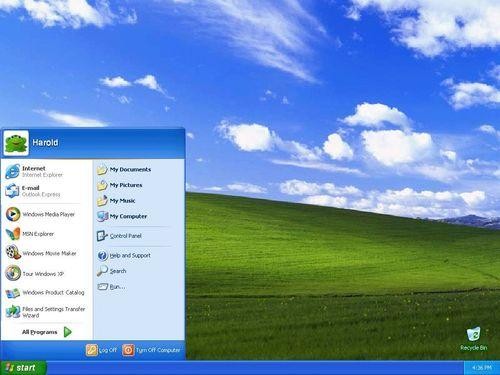
imageThe Windows XP desktop you may know and love.
Bad idea #1: Just don’t worry about itIt’s not like Windows XP computers will magically stop working on April 9. So don’t worry about it; just keep on using it.
Why is this a bad idea? The problem with an old operating system is that it’s not up to speed with modern attacks. Operating systems need to be patched (updated) frequently to keep them safe from data thieves, scammers, viruses, and the like. After April 8, there will be no more updates coming.
But if you plan to keep going with XP for a while, at least make sure you’re on the last, ultimate version of it, called Service Pack 3. After April 8, you won’t be able to upgrade. Windows’ own update utility should manage this for you. Make sure it’s done so.
Microsoft says it will continue to provide updates to its “anti-malware signatures and engine for Windows XP users through July 14, 2015,” so you can continue to use the company’s antivirus app, Microsoft Security Essentials. That is, assuming you already have MSE. After April 8, it won’t be available for download at all. You could also get a possibly better antivirus tool from another vendor. PC Pro recommends Avast 2014. It’s free, and they say it’s better than Microsoft’s own Security Essentials.
But don’t get comfortable. According to Microsoft, even up-to-date security software can’t save you if the operating system itself isn’t secure. And Windows XP just isn’t. Microsoft says, “Our research shows that the effectiveness of anti-malware solutions on out-of-support operating systems is limited. Running a well-protected solution starts with using modern software and hardware designed to help protect against today’s threat landscape.”
So you can keep using XP, but not without risk. You probably don’t want it connected to the Internet, and even plugging a USB drive into it could be unsafe.
Bad idea #2: Upgrade to Windows 8, like Microsoft wants you toWhy not get the latest version of Windows? It’s so shiny!
image
Windows 8.1’s default interface. Get ready to re-learn Windows.
There are two big reasons why this is a bad idea. The first: It probably won’t work. Your old Win XP machine likely does not have the horsepower, the hard disk space, or the hardware to run Windows 8. 
Second: You’ll hate it. Windows 8 (including 8.1) has two separate interfaces. There’s a Windows desktop-like one in there, which you’ll probably find comfortable, but you have to go through the touchscreen-centric primary interface to get to it. That’s fine if you have a tablet. But your XP machine is no tablet.  
You can mostly avoid that tile-based, touchscreen interface, but not completely. It pops up from time to time, usually when you’re in a hurry and stressed out, and it’s frustrating when it happens.

You can also bite the bullet and get a new Windows 8 computer. They’re not expensive at all. They’re just alien.

If you do start over on a Windows 8 machine, Microsoft has tools to make moving your data from XP to Windows 8 fairly straightforward. 
Bad idea #3: Move to LinuxThe geek operating system (sorry, geeks) called Linux is stable, fast, cheap, and free, and will run on your old XP machine better than Windows 8 will. The nerds will tell you it’ll do everything that XP will do. They’re right.
image
The Ubuntu version of Linux. It’ll do everything you want, but you might have to learn a few new concepts.
But here’s why it’s a bad idea: It really is a platform for nerds. Few people you know — unless you know a lot of programmers — will be able to help you out. And your Windows software won’t work. If you have apps you like, you’ll have to find Linux equivalents for them. You’re better off moving to a consumer-friendly operating system.
Bad idea #4: Get a ChromebookWe love the oddball new Chromebooks, Google’s web-centric laptops. They’re cheap, they work great with online apps, and they’re easy to share. 
Why is this a bad idea, then? Because Chromebooks rely on a connection to the Internet. Some functions and apps work when disconnected, but most don’t. And Chromebooks don’t run regular Windows programs (Photoshop, Quicken, iTunes, and so on). Chromebooks are great for specific purposes and people (they are great for kids at home or school, for example), but they’re not quite ready to replace Macs or Windows PCs for everybody.
image
The HP Chromebook 11. A solid laptop.
Don’t like these bad ideas? Then try one of these other directions:
Better idea #1: Upgrade to Windows 7The version of Windows that predates Windows 8 is really good. It’s stable and conceptually similar enough to Windows XP that a transition will not be difficult.
It’s not a perfect solution, though. Your machine may not have the juice to run Windows 7, either, as it actually takes a slightly more powerful computer to run Windows 7 well than Windows 8. But you can, for the time being still buy Windows 7 (even though it’s not clear if Microsoft is still manufacturing Win 7 disks), and some hardware vendors still sell computers with Windows 7 installed on them.
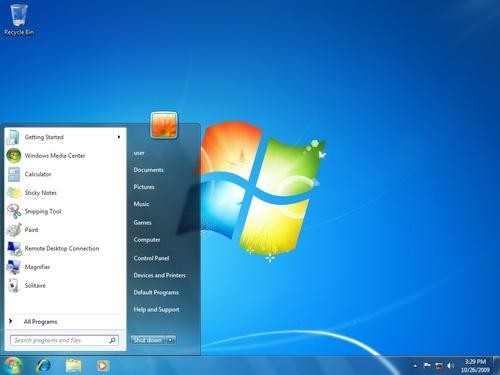
imageWindows 7.  Comfy.
Microsoft really wants you on Windows 8, obviously. A Microsoft spokesperson took pains to remind me that Windows 8 is more secure, faster, and uses less energy than Windows 7.
But the easiest new version of Windows to learn after Windows XP is Windows 7, so if you’re just using Windows to run a particular app, it’s a very good option.
Better idea #2: Get a MacBizarrely, it’s easier to move from Windows XP to the Macintosh operating system, OS X, than to Windows 8.1. There are maddening small differences, but conceptually OS X is similar enough to Windows XP (and every other version of Windows other than Windows 8). It doesn’t take people very long to adapt. Most (though not all) good apps are available in Mac versions, too, and your data files should transfer over just fine.
image
The MacBook Air
It’s an expensive move, though. The cheapest new Mac costs $600 (the entry-level Mac Mini; you can use the screen, mouse, and keyboard from your old Windows computer). Laptops start at $1000 and desktops at $1,300. Complete Windows machines today start in the $300 range, or very nicely equipped at about $600. If you can afford it, though, and you’re not married to specific Windows XP software, Macs are a treat to use. 
You’re not aloneWhy are people still using Windows XP? I asked my Facebook followers and got good answers from people who are. Some people keep old machines for specific purposes, like running XP-only software and the like. Some just take the enlightened opinion that if they have a computer that works for what they want, there’s no reason to spend money and time on an upgrade.
Just because a manufacturer deems one of its products obsolete, it doesn’t mean everyone who uses such a product has to stop using it immediately. However, over time, an old product in the modern world will develop problems: It will be less safe, or there won’t be people to fix it, or some other product it relies on will fail, and replacements won’t be available any longer. Yes, I’m talking about Windows XP, but the same is true if you’re still driving a 1976 AMC Pacer.
When you get into this part of the cycle, you might be forced to move on. But you have a lot of options when you decide to do so — and they might not be the options that the manufacturer recommends.

Tuesday, 4 March 2014

Windows XP won't die without a fight

Windows XP continues to hang on.
(Credit: CNET)
Microsoft continues to urge people to dump Windows XP as it preps to end support for the operating system next month, but the 13-year-old OS refuses to go away quietly.
XP's cut among desktop operating systems actually rose slightly the past two months, according to the latest Web traffic numbers from market tracker Net Applications. In February, XP's share inched up to 29.5 percent from 29.3 percent in January and 28.9 percent in December.
Of course, those are minor increases, a possible blip in XP's long-term decline. Just two years ago, XP was still the dominant desktop OS with a 46 percent share, according to Net Applications. A year later, that number had dropped to 39 percent before falling to the most recent figures.
A share of almost 30 percent still leaves a hefty number of XP diehards among the more than 1 billion Windows PCs worldwide.
So why is XP proving so resilient?Microsoft will officially curtail support for XP on April 8, which means no more bug fixes, security patches, or other automatic updates. Starting March 8, Microsoft will start nagging XP users with a pop-up window reminding them of the cutoff date.
Without knowing the specific breakdown, I think it's a safe bet that XP's strongest hold is in the business world. A home PC user can upgrade to a newer flavor of Windows without too much hassle. But businesses face a number of obstacles.
Large enterprises must move thousands or tens of thousands of employees to the new version of Windows. That process requires compatibility testing both for hardware and software, scheduling, user training, and a variety of other tasks. Most enterprises should've already switched to Windows 7 by now. Those still stuck on XP face a time-consuming upgrade process.
Small and mid-sized business have their own hurdles. Many don't necessarily have a dedicated IT staff, so they have to perform software upgrades on their own. Businesses with legacy hardware and software are up against an even tougher challenge.
Think of all the hospitals, doctor's offices, laboratories, banks, and other businesses that use certain equipment tied to a specific version of Windows. Bloomberg recently cited a report from US ATM supplier NCR, which said that XP still runs on more than 95 percent of the ATMs in the world.
Microsoft certainly would like to see XP vanish in favor of Windows 7 and 8, but the old yet still vital OS is likely to stick around for some time to come.

Wednesday, 26 February 2014

Maintaining Windows XP After April 8 May Cost Rs.1,190 Crore/Year


NEW DELHI: As Microsoft ends support for its popular Windows XP on April 8, the overall annual maintenance bill for Indian firms with PCs running on this operating system, especially banks and financial institutions, could shoot up to $192 million (about 1,190 crore).

The US-based software giant today said its PC install base for large enterprises in India is about 4 million units, of which around 84 per cent have migrated from the Windows XP.

According to research firm IDC the cost of maintaining a PC that runs on Windows XP OS after April 8, could run up to $300 per PC per year, as against the present cost of $75-100.


Windows XP - launched in October 2001 - is three generations behind the latest operating system Windows 8, that was launched in October 2012. The current XP version is called Windows XP Service Pack 3. Microsoft will stop support service to 'Windows XP' OS from April 8.


"Our customers use Windows OS to run critical processes, which help them at work and in their lives. It is important for them to move from XP. At present about 84 per cent have stopped using this," Microsoft India Managing Director Karan Bajwa said here.


Of the 16 per cent still using Windows XP, BFSI segment and state-owned enterprises have the lion's share (35 per cent each) followed by manufacturing, communication, IT-ITeS, etc, he added.

Monday, 3 February 2014

Oops, Windows XP gains in January but so does Windows 8.1

Windows XP will not die, according to January numbers from Web tracker Net Applications. But the not so well loved Windows 8.1 is also seeing some life too.
The doomed operating system -- that would be XP, support for which will end on April 8 -- actually gained a fraction of a percentage point of desktop OS share, rising to 29.23 percent in January from 28.98 percent in December, according to Net Applications.
Put another way, about two months before Microsoft pulls the plug, Windows XP still powers more than one-quarter of all PCs.
Microsoft is concerned because the end of support for XP means that PCs "go unprotected," as the company warns on an end-of-life XP page.
In January, Windows 8.1 finally passed Vista. Windows XP made a small gain.
(Credit: Net Applications)

But Windows 8/8.1 combined share still pales in comparison to the Windows 7 trajectory, after its release in 2009. After less than one year, Windows 7 had a 17 percent desktop OS share.But it's not all bad news for Microsoft.Windows 8.1 finally passed Vista: the former had a 3.95 percent share, up from 3.6 percent in December, while the latter registered 3.3 percent, down from 3.61 percent in December.
After 15 months, Windows 8/8.1 is far below that.
Windows 7 was off slightly in January to 47.49 percent. It recorded a share of 47.52 percent in December.