Every now and then, the universe shifts. Humanity sees the earth from space. The Berlin Wall falls. Justin Bieber apologizes.
And now this: Microsoft has put Internet Explorer on an ice floe and pushed it out to sea to die.
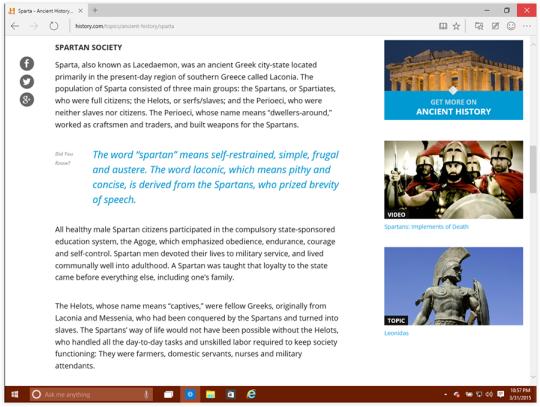
When Windows 10 comes out this summer, it will have a new, much more modern Web browser, code-named, for now, Project Spartan. (That won’t be its final name.)
Why would Microsoft do this? Doesn’t it have the world’s most popular browser, Internet Explorer?
Well, yes. When you consider how many people are using all versions of Internet Explorer, Microsoft’s browser still represents over 50 percent of all Web visits. So, OK, maybe not “most popular” for some definitions of popular. But most used, yes.
But over the years, IE has accumulated two bad kinds of cruft and baggage.There’s the underlying code, which has become outdated and bloated over thedecades. And then there’s a worse problem: the reputational baggage. Peoplejust don’t think much of Internet Explorer. It’s the butt of jokes and insults, and its 50 percent market share is actually a low point; its market share has been declining for years.
Enter Project Spartan
On Monday, Microsoft revealed a rough, early version of Spartan, so that programmers and power users could get their hands on it and supply feedback.
“This preview is NOT a polished, ready-for-everyone release,” cautions Microsoft product manager Joe Belfiore on his blog.
And that’s true. This is a preliminary sketch of a Web browser. Microsoft makes no pretenses of its being complete. But the point is to crowdsource this browser’s development, both before and after the 1.0 version appears this summer, with Windows 10. That is, Microsoft plans to continue refining and improving Spartan, with a steady stream of updates through its life.
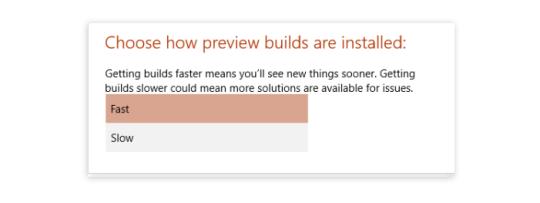
(“Not for everyone” also applies to the act of getting Spartan. It requires downloading the very latest technical preview of Windows 10, which requires signing up for the Windows Insider Program. Then, in the Windows Update settings, you have to click “Advanced options” and switch your preview-downloading settings to Fast. Then tell Update to download the latest software updates — they’ll include the new Windows 10 build and Spartan.)
Even in their evolving stages, though, both Spartan and Windows 10 look terrific.
Here’s what characterizes this first public release of the Spartan browser:
* A modern engine. Spartan abandons the caked-up, decades-old plumbing of Internet Explorer and replaces it with a new engine, tuned for the modern Web. “Faster, more secure, and more reliable,” Microsoft says.
We’ll see about reliable — this fledgling version crashes often. But already, it’s fast and clean.
* A cleaned-up design. It’s really slimmed down. You might even say its look is spartan.
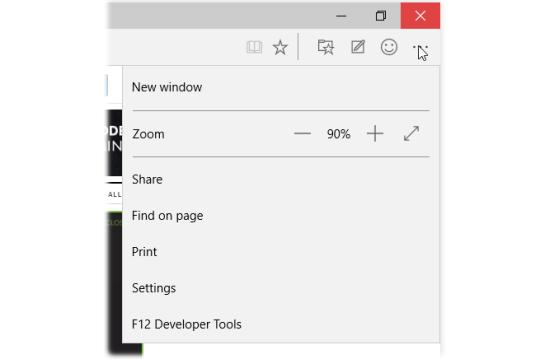
There are no traditional menus at all (no File, Edit, or View), not even if you tap the Alt key. There are only two toolbars across the top. One displays your side-by-side tabs (wasted space if you have only one tab open). The other displays the standard address bar, Back/Forward/Reload buttons, and five icons at the right side. One of them opens up the closest thing Spartan has to an actual menu:
See the smiley-face button next to this menu? It won’t be in the final version. It’s there to let you report bugs (and happy surprises).
* Cortana. Cortana is Microsoft’s Siri or Google Now — a virtual assistant. She’s built into Windows 10, and into Project Spartan. (Cortana, of course, is named after an artificial-intelligence character in the video game “Halo.”)
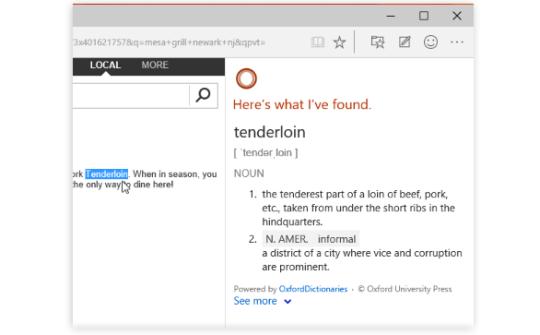
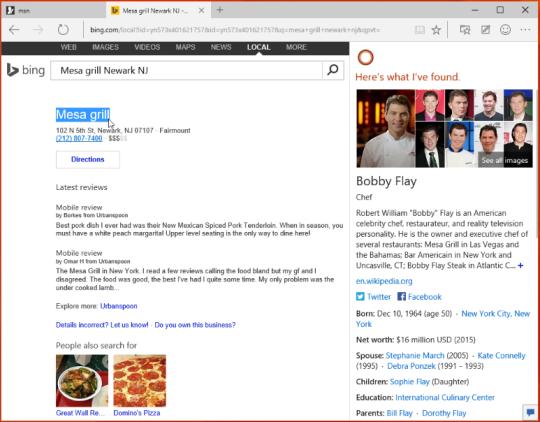
In the first public version of Spartan, you can use Cortana to get extra details about whatever you’re looking at. You can right-click a word, and, from the shortcut menu, choose Ask Cortana; a panel opens on the right side. It may offer a dictionary definition of the highlighted text, or a Wikipedia-type article.
When I tried asking Cortana about the street address of a restaurant, expecting her to provide driving directions, I was surprised to discover that she gave me instead real-estate details about the building itself, including the estimated current purchase price.
In some situations, just typing something into the address bar (like “weather”) produces a drop-down panel containing relevant information (like the local weather).
Microsoft plans to add a lot more to Cortana’s smarts in the next few months. Also, at the moment, she’s U.S. only.
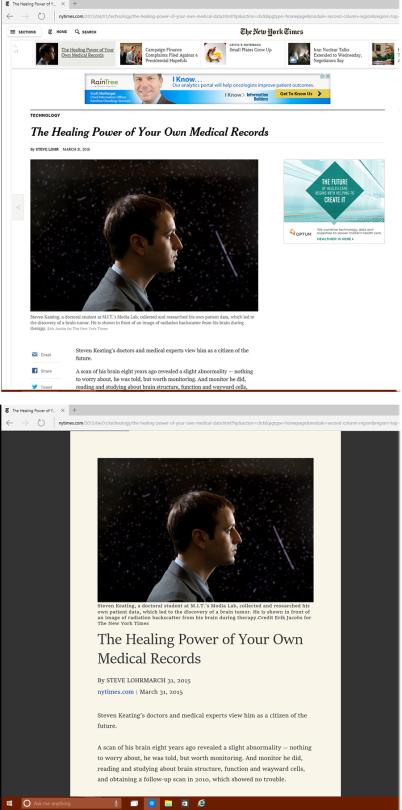
* Reading View. As in Safari, this view strips away everything from the Web page you’re reading except the text and photos. No ads, blinking, links, banners, videos, or promos.
The text is also changed to a beautiful font and size, and the background is simplified to a soothing shade. It’s fantastic.
Here’s the before and after:
In the current version, the Reading View is unavailable on many sites, including Wikipedia, Yahoo, and even Microsoft’s own MSN.com. But it works beautifully on The New York Times, USA Today, and other newspaper sites.
Frankly, it’s hard to understand how anybody can get through an online article without this feature.
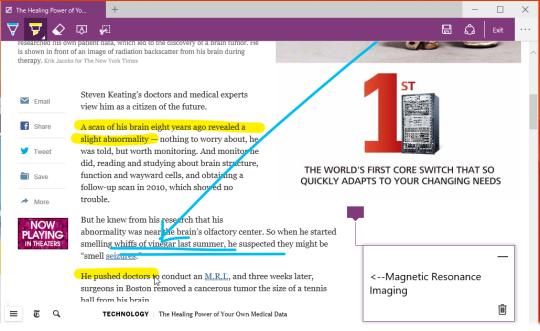
* Annotations. With one click on a special button at top right, you open a toolbar full of annotation tools. You can use them to mark up a Web page.
For example, you can create a text box and type some notes; drag across text with a yellow highlighter; draw arrows, graffiti, or obscenities with colorful “ink.” Once you’ve sufficiently vandalized the page, you can export the result as a canned graphic, to an app like OneNote or a sharing site like Twitter. (You’re not actually making changes to the live Web page. Sorry, script kiddies.)
It’s neato, especially when you’re using a touch screen — drawing with your finger on a Web page is giddy fun. Microsoft suggests that this feature is great for doing research, and I suppose it’d be handy when you’ve been trying to win an argument and you find something online that supports your point. Otherwise, though, it’s not exactly clear how often you’ll use this feature.
What’s to come
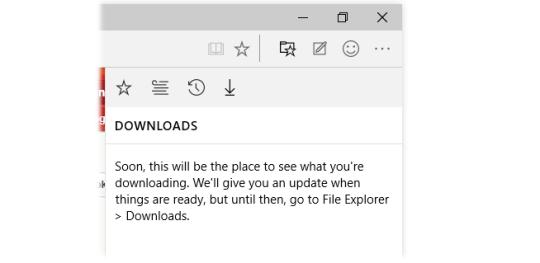
Lots and lots of standard browser features will be in place for the finished product, Microsoft says. Still to come: A History list, Downloads list, offline Reading list, and syncing of tabs and bookmarks across multiple machines.
Microsoft says that the finished browser will also offer extensions: plug-in features, like the ones offered for Firefox and Google Chrome, that let you customize your browser to within an inch of its life. Extensions are awesome. This is great news.
Now, Internet Explorer isn’t exactly dead. It’s still there on the Windows 10 taskbar, right there with the Project Spartan icon, and Microsoft plans to support it for corporations who rely on it.
But it’s safe to say that work on Internet Explorer — creating new versions, new features — is pretty much over at Microsoft. Spartan is the new Microsoft browser.
And from what we can see so far, that’s terrific news for everyone.
Microsoft is releasing a preview of its Internet Explorer successor, Project Spartan, today. The new browser, which will be the default web experience in Windows 10, is part of an update to the PC Windows 10 preview. Microsoft promised faster builds for testers, and it’s delivering on that promise today. After less than two weeks, Windows 10 testers can now download a new build (10049)that will include the Project Spartan browser. If you’re already running a preview version of Windows 10 then it’s available immediately from Windows Update, otherwise you can join the Windows Insider program to test Project Spartan and Windows 10.
While Microsoft demonstrated a variety of Project Spartan features back in January, not all of them are enabled in today’s preview. Cortana, Microsoft’s digital assistant, is included with features like contextually aware suggestions, and assistance for weather or stocks information. While Cortana is present, calendar and flight information won’t be available as part of today’s preview, and the digital assistant is limited to the US for now in Project Spartan. Similarly, an updated Reading View mode is available in the Spartan preview, but roaming across devices and saving offline aren’t available just yet. Both features are planned for the final version of Windows 10 and Project Spartan which will ship in the summer.
One of Spartan’s more impressive features is the ability to annotate notes with a pen. While recently leaked builds of Spartan didn’t feature this, today’s preview will include this new Web Notes function. You can write or type directly on to a webpage, and share the comments through email, social networks, or through OneDrive. Microsoft even supports OneNote too, for easy clipping of web pages and inking comments or notes on them.
Today’s preview is just an early look at Project Spartan, and Microsoft is promising to update its new Windows 10 browser frequently. “Project Spartan will be regularly updated,” says Microsoft’s Joe Belfiore. “The team is engaging with customers and partners closely to tune and update plans.” Microsoft previously revealed it also plans to support extensions in Project Spartan in a future update, so new features are clearly in the works. Microsoft is also preparing to release a new Windows 10 for phones preview, and it’s likely that Spartan will be included in that release.
While Project Spartan is a successor to Internet Explorer, Microsoft is still planning to ship its “legacy engine” browser in some versions of Windows 10. The Verge understands that the software giant is currently evaluating a number of different ways to ship Internet Explorer in Windows 10 to those who require it, and that it will be primarily targeted at enterprise customers. Microsoft is not pinning Internet Explorer to the task bar or Start Menu in Windows 10, and Project Spartan will take over. Today’s preview includes that new behavior, and we hear that Internet Explorer could eventually become a Windows feature that you have to enable to get access to the old browser. Internet Explorer itself (the app) might not be fully dead just yet, but Microsoft is killing off the brand name in favor of a new name for Project Spartan, and the company says it’s the future of its browser efforts.
While Microsoft has dropped hints that the Internet Explorer brand is going away, the software maker has now confirmed that it will use a new name for its upcoming browser successor, codenamed Project Spartan. Speaking at Microsoft Convergence yesterday, Microsoft’s marketing chief Chris Capossela revealed that the company is currently working on a new name and brand. “We’re now researching what the new brand, or the new name, for our browser should be in Windows 10,” said Capossela. “We’ll continue to have Internet Explorer, but we’ll also have a new browser called Project Spartan, which is codenamed Project Spartan. We have to name the thing.”
Internet Explorer will still exist in some versions of Windows 10 mainly for enterprise compatibility, but the new Project Spartan will be named separately and will be the primary way for Windows 10 users to access the web. Microsoft has tried, unsuccessfully, to shake off the negative image of Internet Explorer over the past several years with a series of amusing campaigns mocking Internet Explorer 6. The ads didn’t improve the situation, and Microsoft’s former Internet Explorer chief left the company in December, signalling a new era for the browser.
Capossela also detailed the power of using the Microsoft brand over just Windows or Internet Explorer, and showed off some research data on a new name for the company’s browser vs. Internet Explorer. Putting Microsoft in front of the new secret name increased the appeal to some Chrome users in the UK. “Just by putting the Microsoft name in front of it, the delta for Chrome users on appeal is incredibly high,” says Capossela.
Microsoft is clearly testing names with market research, but it’s unclear when the company plans to unveil the final name for its Internet Explorer successor. Judging by Microsoft’s own research, it’s obvious the company will move as far away from Internet Explorer as possible, and it’s likely Project Spartan will have the Microsoft name attached to it.
Elsewhere in Capossela’s talk, the Microsoft executive also discussed the ways the company will make money in future, and clever ways the company is making use of social media. Microsoft has started to use artists to respond to Twitter users with personalised images, and at least one from the Xbox team was successful at creating attention with an impressive 35,000 retweets. It’s all part of improving Microsoft’s brand perception, and a general admission from the company that it’s ready to be loved again.
Microsoft has yet to patch its latest critical Internet Explorer zero-day security flaw, but an advisory about the bug now offers two temporary solutions.
And the potential reach of the bug could be widespread. Estimates of IE usage range from about 22 percent of people browsing the Web (StatCounter) to more than half of the desktop browser market (NetMarketShare).
So what does Microsoft suggest for people who still need to use Internet Explorer? Turn on a feature called Enhanced Protected Mode. Introduced in IE 10, this mode adds an extra layer of protection by preventing malware attacks from infecting your system.
Microsoft explains how to enable Enhanced Protected Mode (EPM) in the "suggested actions" sectionof its advisory. The steps are outlined as follows:
To enable EPM in IE 10 or 11, click the Tools menu and then click Internet options.
In the Internet Options window, click the Advanced tab.
Scroll down the list of options until you see the Security section.
Look for the option to Enable Enhanced Protected Mode and click its checkbox to turn it on.
If you're running IE 11 in a 64-bit version of Windows, you also need to click the checkbox to Enable 64-bit processes for Enhanced Protected Mode.
Restart IE to force the new setting to take effect.
EPM is saddled with a couple of limitations. The feature supports only IE 10 and 11 and only 64-bit versions of Windows. And some websites and add-ons won't work with EPM enabled.
How do you protect yourself if you're running an older version of IE or use a site that doesn't play nicely with EPM? You can unregister an associated IE DLL file called VGX.DLL. Microsoft explains how to unregister this file in the suggested actions section.
Until Microsoft can patch this bug, the best option is to use an alternate browser such as Firefox or Google Chrome. But those of you stuck on IE can at least better protect yourself by following Microsoft's suggestions.