Pages

Showing posts with label Apps. Show all posts

Friday, 24 April 2015

Report: One in Five Android Apps Is Malware

Report: One in Five Android Apps Is Malware
(Thinkstock)
Bad news, phandroids. Android malware is on the rise.
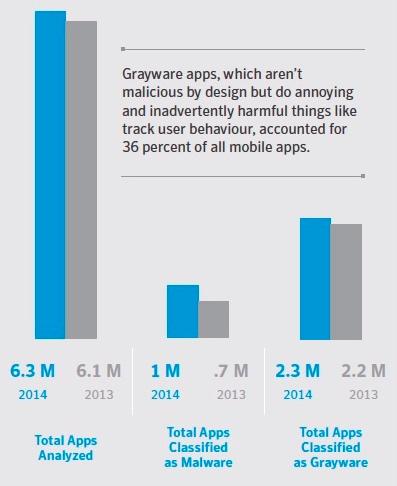
According to Symantec’s latest Internet Security Threat Report, “17 percent of all Android apps (nearly one million total) were actually malware in disguise.” In 2013, Symantec uncovered roughly 700,000 virus-laden apps.
More than one third of all apps were what Symatec calls “madware,” or mobile software whose primary purpose is to bombard you with ads. The company also discovered the first example of mobile crypto-ransomware – software that encrypts your data and holds it hostage until you pay ransom for it – for Android devices.
symantec norton internet threat security report
(Norton Mobile Insights)

How to stay safe

The good news is that it’s pretty easy to avoid infection if you obtain your apps from a trusted source, like the Google Play Store. The company doesn’t break out how many of the 1 million+ malware apps were found in the Play Store, but Symantec’s Director of Security Response Kevin Haley admits the number is probably quite low.
“Google does a good job of keeping malware out of the Store,” Haley says. “And if a malicious app does make it in there, they do a good job of finding it and getting rid of it.”
On the other hand, if you visit alternate Android app markets, download apps from app maker’s Websites, get them via email links, or find them on Bit Torrent sites, you run a much greater risk of infecting your phone, he adds.

Other App Stores

Symantec used its Norton Mobile Insight software to crawl more than 200 Android app stores, downloading and analyzing more than 50,000 apps and app updates each day in 2014.
Most of the malware found by Symantec tries to steal personal data like phone numbers and contact lists, which are then sold on the Internet’s black market, says Haley. Some may cause your phone to send text messages to premium SMS services, automatically adding charges to your monthly bill. Other apps may pelt you with ads that pop up randomly over other applications. Some apps even change your default ringtone to an advertisement, Haley says.
The Android malware problem is greater overseas, especially in regions where users can’t access Google Play and must rely on third-party app marketplaces.
image
Mobango is one of hundreds of alternate Android app marketplaces in the wild. Be careful out there. (Mobango.com)
If you see unusual charges on your bill for premium texting services or ads start popping up where you don’t expect them, those are good signs you’ve got an infection, he adds. Your best recourse is to use a mobile security app to scan and protect your phone.
As for iOS? Symantec found a grand total of 3 infected apps in the iTunes store in 2014. Last year it found zero.
“One of the benefits of Android versus iOS is that it gives you a lot more freedom as to where you can download apps,” Haley says. “But that freedom comes with a cost.”

Monday, 2 March 2015

How to Stop Others From Accessing Your Android Apps

smart_applock_google_play_cropped.jpg
You hand over your phone to someone to make a call, or look up something on the Internet and the next thing you know, they're browsing through your messages. Most people know better than to be so rude, but we all know that one person who really doesn't understand why this is bad manners.
It's not like everyone has something to hide, but these days we all carry a virtual record of our lives in our pockets. Our smartphones have a lot of personal information we do not want other people to see.
One way to protect your privacy is to set a password lock on your phone. While that serves the purpose in most cases, it's no use when you pass your phone to someone for a quick call or if they want to check something. It's for times like these that a password lock for individual apps can come in handy. There are lots of apps for Android that let you do this, but Smart AppLock is our favourite.
This is how you can set up Smart AppLock to protect your apps from the curious friend:
  1. Download Smart AppLock.
  2. When you first fire up the app, it'll ask you to set the password. The default password is 7777, as you'll see in the password hint on screen. Tap those numbers in to open the app.
  3. Now the App Lock tab will show up.
  4. Tap the green + button at the bottom.
  5. Select apps you want to lock down with a password. All you need to do is tap the checkmark next to each app that you want to protect.
  6. Tap ADD.
  7. Next to each app, you'll see a button labelled FAKE. Tap this button to enable a fake app crash message. Whenever you open that app, you will see a message like, "Unfortunately, WhatsApp has stopped." This will show the name of whichever app you have enabled the setting for. If someone sees the message and taps OK, Smart AppLock returns to the home screen. But if you tap and holdOK, you'll be asked to enter the app password.
That's it. Now all the apps you selected are hidden behind a password. But it's a good idea to change the default password and here's how you can do that:
  1. Swipe left to the Settings tab.
  2. Tap Password & Pattern Settings.
  3. Tap Password and key a new numeric code.
  4. Tap Password hint to replace the hint set by default.
  5. You can also switch to a pattern lock, gesture lock or character password lock. Tap Lock Type to switch.
This will set a common password for all the apps you picked. If you want a different password for any of your apps, try these steps.
  1. Open Smart AppLock and swipe left to the Settings tab.
  2. Tap Multiple Passwords.
  3. Tap Add Password.
  4. Here you can select individual apps by tapping Locked Apps.
  5. Tap the checkmark next to the apps you want to lock and tap Add.
We really liked Smart AppLock because it doesn't just protect your apps. It does this in a way that prevents any unauthorised user from knowing that something is up. This way, you can keep your stuff private, without getting into a fight with someone over it. Do you create password locks for individual apps? Let us know how via the comments.